
Numerous Ai
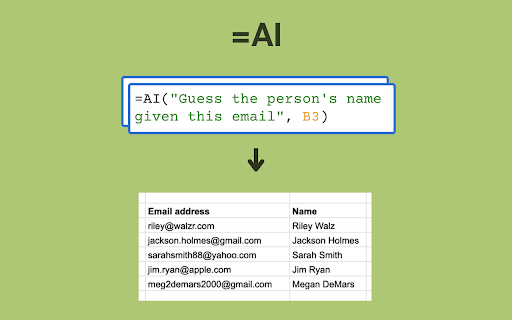
To be verifiedNumerous.ai ai chrome extension? Numerous.ai is a Google Sheets plugin and Chrome extension that leverages AI to enhance spreadsheet functionality. It allows users to perform repetitive tasks, generate formulas, explain complex formulas, and write text using AI directly within Google Sheets. The plugin uses the =AI() function to interact with ChatGPT, enabling tasks like summarizing text or extracting information. The Chrome extension provides faster access to the plugin's features.
AI-powered Google Sheets plugin for automation and enhanced functionality.
Browser ExtensionContact for PricingWebsiteFreemium
Overall score
—(0 reviews)
chromewebstore.google.com/detail/numerousai/hbjoofdalcnhalhjodhechdpolcfpipb
What is Numerous Ai?
AI-powered Google Sheets plugin for automation and enhanced functionality.
Numerous.ai ai chrome extension? Numerous.ai is a Google Sheets plugin and Chrome extension that leverages AI to enhance spreadsheet functionality. It allows users to perform repetitive tasks, generate formulas, explain complex formulas, and write text using AI directly within Google Sheets. The plugin uses the =AI() function to interact with ChatGPT, enabling tasks like summarizing text or extracting information. The Chrome extension provides faster access to the plugin's features.
Core Features
AI-powered formula generation
To be verified.
AI-driven text summarization and extraction
To be verified.
Automated task completion through example learning
To be verified.
AI-assisted text writing
To be verified.
Formula explanation in plain English
To be verified.
Faster plugin launch via Chrome extension
To be verified.
Popular Use Cases
- Summarizing customer support messagesTo be verified.
- Determining the state associated with a phone numberTo be verified.
- Formatting hundreds of cells automaticallyTo be verified.
- Categorizing large datasetsTo be verified.
- Performing sentiment analysis on text messagesTo be verified.
- Generating taglines for brandsTo be verified.
- Writing personalized thank you messagesTo be verified.
- Generating complex formulas from plain English descriptionsTo be verified.
- Understanding complex formulas in spreadsheetsTo be verified.
Feature Comparison
A functional comparison based on maker input.
To be verified.
Comparison details are provided for informational purposes and should be verified with the official website.
How to use
- Use the =AI() function in Google Sheets to prompt ChatGPT for tasks like summarization or information extraction. Teach the AI by providing examples and using the 'Infer' function for repetitive tasks. Use =WRITE() to generate text. Use plain English to generate formulas. Use 'Explain formula' to understand complex formulas. The Chrome extension provides faster access to the plugin.
Pricing
Numerous Ai uses a freemium pricing model. Pricing and features may change over time.
Free
$0
To be verified
Pro
To be verified
To be verified
Team
To be verified
To be verified
Enterprise
To be verified
To be verified
Deal / Coupon
No coupon listed.
Why is it fantastic?
No review tags yet.
What can be improved?
No review tags yet.
Frequently Asked Questions
Verification
Tool status
To be verified
Pricing verified
To be verified
Founder claimed
No / To be verified
Source
Official website / Community submitted
Related Tags
AI WritingContent GenerationResearchEmail WritingSummarizationRewritingAcademic ResearchBrowser ExtensionFreemium
Own this tool?
Claim this profile to update product information, pricing, and official answers.